
To keep a restaurant operating in Nivalis Nights, first check the ingredients required by your active menu, open the shopping list, buy the missing items from suitable vendors, and transfer them into the venue inventory. Pay attention to freshness and each item’s storage requirement before choosing the cheapest stock. Fishing and greenhouses can supplement purchased food later, but vendors are the direct solution during the opening noodle-bar tasks.
A complete launch-build ingredient catalog has not been verified. Prices also change over time and between trading situations. This guide therefore focuses on the controls and decisions that let you find and manage the ingredients your own restaurant currently needs instead of presenting an incomplete list as a full database.
The Ingredient Workflow at a Glance
Use this sequence whenever a venue runs low:
- Open the venue menu and identify the dishes currently being served.
- Inspect each dish’s required ingredients and equipment.
- Check the venue inventory before leaving so you do not buy stock you already have.
- Open the shopping list to see the immediate restocking demand.
- Compare suitable vendors for availability, price, and freshness.
- Buy a controlled quantity, especially when an item will decay soon.
- Return to the restaurant and transfer the purchases into its storage.
- Confirm that ingredients with cold-storage requirements are in appropriate storage.
- Recheck the venue after service begins because active dishes consume stock.
This is a repeating operating loop rather than a one-time tutorial task. The first restock may get the noodle bar through the day, but continued service creates new demand.
Check Recipe Requirements Before You Buy
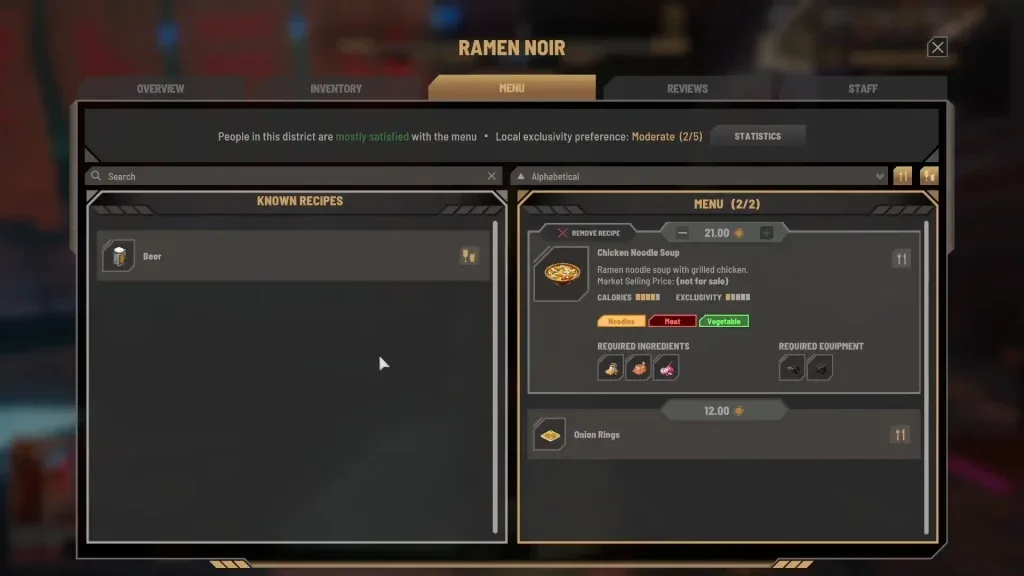
The menu and recipe view should be your starting point. It shows the required ingredients for a dish and can also show required equipment. Ingredients alone will not make a dish available if the venue lacks the necessary appliance.
The opening noodle-bar tutorial provides an example. The venue begins with five chicken, five onions, and five ramen noodles in its inventory. The displayed ramen noodle soup with grilled chicken uses those ingredient types and also requires a food processor and a cooker. Treat this as an early-game example, not as a complete recipe or ingredient list.
Before shopping, separate three different questions:
| Check | What to inspect | Why it matters |
|---|---|---|
| Menu demand | The dishes currently enabled at the venue | Only active dishes create the immediate service demand you need to cover |
| Ingredient demand | The required ingredients displayed for each dish | This tells you which food categories to buy or produce |
| Equipment demand | Appliances listed with the recipe | A full pantry cannot compensate for missing preparation equipment |
| Existing stock | Counts in the venue inventory | This prevents unnecessary purchases and exposes the actual shortage |
| Storage requirement | The item detail and its storage cue | Some ingredients require refrigeration or freezing |
A newly unlocked dish can introduce several new ingredients at once. Do not add every available recipe to the menu and then purchase blindly. First inspect what the new dish would add to your shopping burden, how quickly those items may decay, and whether your current storage can hold them correctly.
Use the Shopping List at Vendors
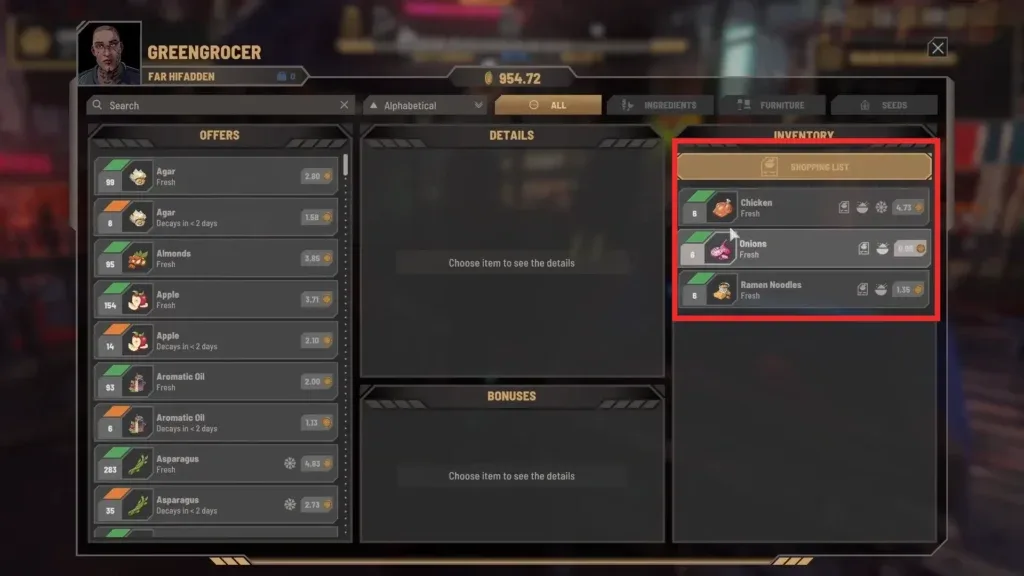
During the opening noodle-bar sequence, the shopping list identifies chicken, onions, and ramen noodles as the required restock. The launch-build keyboard shortcut for the list is L. The vendor trade interface also contains shopping-list and shop-inventory views, along with a search field that helps narrow a larger inventory.
A practical shopping trip looks like this:
- Read the list before you leave the venue.
- Visit a vendor and switch to the shopping-list view when available.
- Search for an ingredient by name if the full inventory is difficult to scan.
- Check the quantity, freshness information, and price of each available stack.
- Purchase only after comparing the stock with what remains at the venue.
- Repeat at another vendor if the first one does not carry everything you need.
- Return to the restaurant and transfer the purchased food into venue storage.
The game’s trading guidance says to explore Nivalis to find the best vendors and deals. Vendor prices change with the market over time, your relationship with a vendor can influence the price, and daily deals may alter the best purchase on a particular day. Trading frequently can also lead to better discounts. As a result, there is no single fixed price table that remains correct for every save and day.
The cheapest visible stack is not automatically the best purchase. A low price can be offset by short remaining freshness, unnecessary quantity, or the cost of storage you do not have. Compare the total usable stock rather than looking at the unit price in isolation.
Buy for Freshness and Storage, Not Just Price
Ingredient listings can expose freshness or decay information. Some vendor stock can already be marked as decaying in less than two days. That made it cheaper, but also created a short window in which the restaurant could use it.
Use these checks before confirming a purchase:
- Immediate demand: Buy short-lived stock when the venue is likely to consume it soon.
- Existing quantity: Count what is already in the venue rather than relying only on a restock warning.
- Menu overlap: A focused menu can make the same ingredient useful across more of the service demand, although no ideal menu or exact overlap calculation has been verified.
- Freshness: Discounted older stock may be useful for immediate service but risky as reserve inventory.
- Storage type: Inspect whether the item should be kept in refrigerated or frozen storage.
- Storage space: Make sure the venue has somewhere appropriate to place the purchase.
- Available cash: Leave enough operating cash to cover needs other than a single ingredient order.
Restaurants provide some storage, and you can extend it by buying and placing cabinets, shelves, fridges, and freezers. The interface identifies items that need colder storage; some meat entries show a freezer requirement. Follow the item’s displayed requirement rather than assuming every ingredient can go into the same container.
Do not infer that transferring food to a venue solves every freshness problem. Storage choice and purchasing quantity still matter. If your restaurant cannot use a large batch before it deteriorates, a smaller order can be safer even when the larger stack appears cheaper.
Transfer Purchases Into the Venue Inventory
Buying an ingredient is only part of the restock process. The restaurant must have access to the stock in its own inventory. After returning to the venue, open the relevant inventory and transfer the purchased items into the restaurant’s storage. The venue inventory offers a Transfer All action for this delivery step.
After transferring, verify the result instead of immediately leaving:
- Confirm that the venue inventory count increased for every required ingredient.
- Check that the active recipe now has its required ingredient types represented.
- Inspect cold-storage requirements for meat or any other item carrying a refrigeration cue.
- Make sure the venue still has enough capacity for the next restock.
- Watch the counts after service resumes to learn which ingredient is being consumed fastest.
This verification matters because a full personal inventory and a stocked restaurant are not the same operational state. The reliable check is the stock displayed for the venue that is serving the dish.
Choose the Right Ingredient Source
Purchased food is not the only source of restaurant ingredients, but each alternative serves a different purpose. The launch-build material supports three broad supply routes.
| Source | Supported use | Main consideration |
|---|---|---|
| Vendors | Directly buy ingredients needed by the shopping list | Prices, freshness, availability, relationships, and daily deals affect the purchase |
| Fishing | Catch fish for restaurant stock or sell the catch on the market | It requires access to fishing and takes player time that could be spent elsewhere |
| Greenhouses | Grow produce for restaurants or market sale | They require planting, harvesting, and suitable greenhouse setup |
Vendors are the most direct answer when the current objective tells you to restock a specific item. Fishing can supply fish ingredients and can also produce stock to sell, but the complete fishing procedure belongs to its own guide. Greenhouses provide a renewable produce route and allow growing conditions to be adjusted, but they are a separate system rather than an instant replacement for the first shopping trip.
A community discussion reports that greenhouse modules may appear under a furniture filter rather than a food filter at farmer trade windows. The same discussion confirms finding modules at the market farmer, while another player found a farmer in Skyhigh Gardens. Treat this as a player-reported interface tip from the launch period, not as a guaranteed complete vendor list.
Troubleshoot Common Ingredient Problems
A recipe still cannot be served
Open the recipe details again. Check both its required ingredients and its required equipment, then confirm that the food was transferred into the correct venue inventory. A missing cooker, food processor, or other listed appliance is a different problem from a missing ingredient.
The shopping list keeps returning
Restaurant service consumes stock, so a successful restock does not permanently complete ingredient management. Compare the new request with the remaining venue counts. If one item disappears faster than the others, purchase around that observed demand rather than repeatedly buying equal quantities of everything.
A vendor does not show the item you need
Use the search and shopping-list views, remove any filter that could hide the relevant category, and check other vendors. The game explicitly encourages exploring for vendors and deals. Do not assume the first seller carries the complete ingredient range.
Cheap food spoils before it is used
Check the decay information before buying and reduce the batch size. Confirm that any refrigeration or freezer requirement is satisfied. If a manager is adding more stock, monitor those purchases as well because overbuying can compound the freshness problem.
The venue has food but lacks a required ingredient
Look at ingredients by exact type rather than total item count. A restaurant can have a large inventory while still missing the one item required by an active dish. Launch reports of managers buying already-stocked products make this check especially important.