Your starting apartment is 404-B, Sub-Level 12 in Lowtown. The quickest way home is to open the city map, select Lowtown, and choose the apartment destination instead of returning to the district street. If you want to reach it on foot, arrive near the Lowtown noodle shop area, take the alley to the right, and follow the stairs to the apartment entrance.
The important limitation is that the launch build does not provide a reliable, verified list of every rentable apartment in the city. This guide therefore separates the confirmed starting home from other residential doors and temporary shelters instead of inventing addresses that may not be available or may depend on later progress.
Starting apartment location at a glance
| Detail | Starting apartment information |
|---|---|
| District | Lowtown |
| Address | 404-B, Sub-Level 12 |
| Fast-travel destination | The apartment option inside Lowtown |
| Nearby reference point | The Lowtown noodle shop and taxi arrival area |
| On-foot route | Right-hand alley, then the stairway leading to the entrance |
| Main confirmation | The apartment console displays the address and home information |
| Launch-build daily rent | 10 coins |
| Primary use | Sleeping, storage, furnishing, and ending the day safely |
The address is more useful than the appearance of the surrounding streets. Lowtown has dense, similar-looking passages, elevated walkways, signs, and staircases, so trying to remember only a storefront or a single turn can be unreliable. When you enter the correct apartment, use its console to confirm that it is 404-B, Sub-Level 12.
Fast travel directly to the Lowtown apartment
Fast travel is the simplest answer when you are away from home or running short on time before curfew. The city map can show more than a general district destination: Lowtown includes an apartment destination that takes you home without requiring you to navigate the final streets manually.
- Open the city map.
- Select Lowtown rather than another district.
- Check the available destinations inside the district.
- Choose the apartment destination, identified as 404-B, Sub-Level 12, instead of the ordinary street arrival point.
- After loading into the apartment, use the bed when you are ready to finish the day.
Fast travel depends on location access. The map explains that an area becomes available for fast travel after it has been discovered through normal transport such as a taxi, train, or boat. Lowtown is your starting district, so the home destination should be the first apartment route to check. Other parts of the city may remain unavailable until you have reached them through the appropriate travel network or met their progression requirement.
Do not assume that every taxi provides the same destination menu. Individual taxi points can connect to specific places, which makes catching taxis back and forth less dependable than selecting the home destination on the map. If a taxi drops you on the Lowtown street, you still need to find the correct alley and staircase.
Walking home from the Lowtown taxi area
Use the physical route when you are already in Lowtown, want to learn the neighborhood, or cannot select the apartment destination from the map.
- Travel to the Lowtown stop associated with the noodle shop area.
- As soon as you arrive, look for the alley on the right-hand side.
- Enter that alley and locate the stairway within it.
- Follow the stairs through the passage and up toward the residential entrance.
- Watch the navigation display for the apartment marker as you close in.
- Enter the apartment and check the console if you need to verify the address.
The critical landmark is the combination of the right-hand alley and stairs, not simply the noodle shop. If the district street looks familiar but the apartment door is missing, return to the arrival area and deliberately check the alley entrances rather than continuing farther into Lowtown.
The integrated navigation display at the top of the screen can show points of interest, including the apartment, venues, vendors, taxi parking, and trains. Use that display for the final approach. It is especially helpful when buildings obscure the door or when several levels of the district overlap visually.
How to confirm that you found the correct apartment
Entering a residential-looking doorway is not enough to prove that you are home. The starting apartment has several practical identifiers:
- Its console identifies the property as 404-B, Sub-Level 12.
- The console shows the apartment’s equipment information and its daily rent.
- The interior includes a bed that lets you sleep and complete the day.
- The apartment provides personal storage.
- The unit includes a balcony overlooking Lowtown traffic.
- Interior controls include adjustable lighting, helping distinguish the space from an ordinary public room.
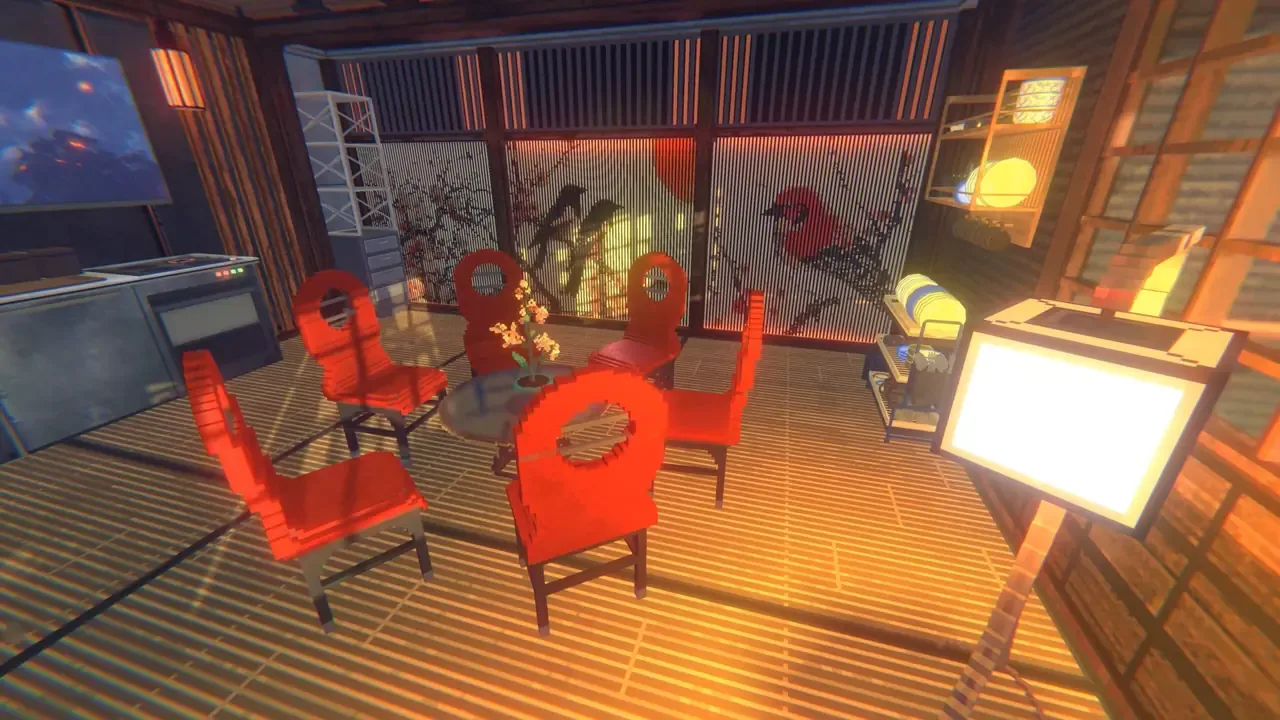
The interior illustration shows apartment furnishings, rather than a route marker or proof of a particular address. Confirm your unit through its console.
The apartment is also a customizable home rather than a fixed decorative backdrop. Apartments can be furnished with items such as furniture, paintings, and lights. Some apartments elsewhere in the game may include balconies or terraces, but those features do not establish a complete location list and should not be used to identify an unconfirmed property.
The starting unit’s launch-build console lists a daily rent of 10 coins. That cost is tied to this confirmed home and should not be treated as the universal price for every apartment. If you are comparing a different property later, rely on the information shown for that specific unit rather than carrying over the starting rent.
Apartments and curfew shelters are different
A home icon does not always mean that you have discovered another apartment to buy or rent. During curfew, the city also provides shelters where you can escape surveillance and use a bed when returning to Lowtown is impractical.
The distinction matters:
| Location type | What it does | How to treat it |
|---|---|---|
| Starting apartment | Your confirmed home at 404-B, Sub-Level 12 | Use it for sleeping, storage, and furnishing |
| Other apartment door | A residential property that may be available through progression or rental | Confirm its status through the door or property interface |
| Curfew shelter | A temporary safe place with an accessible bed | Use it to survive the night; do not count it as an owned apartment |
Shelter doors can resemble apartment or rental entrances. The useful difference is that a shelter is unlocked for emergency access and lets you sleep without becoming your permanent home. Some shelter markers may be much easier to notice during curfew than during the day.
The HUD ping can highlight nearby apartments and places to sleep. On the launch PC controls, C is the commonly used key for this scan. If that key does not activate the highlight, check your current bindings rather than assuming no sleeping location exists. Use the resulting home-style marker to find the door, then read the interaction prompt to determine whether it is your apartment, a rentable property, or a shelter.
This distinction prevents two common mistakes: walking past a usable shelter because it is not your Lowtown home, and treating every shelter marker as proof of another rentable apartment. A shelter solves the immediate curfew problem but does not expand the verified apartment list.
What to do when curfew is close
Choose your route based on time and access rather than automatically attempting the walk back to Lowtown.
- If the Lowtown apartment destination is available on the map: fast travel directly home. This removes the final street-navigation step.
- If you arrive at the Lowtown street: use the right-hand alley and stair route, following the apartment marker for the last section.
- If you are in another district with little time remaining: activate the HUD ping and look for a nearby sleeping location.
- If a home-style door opens onto a room with a usable bed: it may be a temporary shelter, which is sufficient for ending the night safely.
- If the marker is lost among quest objectives: reduce the search to nearby residential doors and repeat the HUD ping instead of following an unrelated tracked task.
Security cameras and drones make aimless exploration after curfew risky. A nearby shelter is therefore a practical fallback, not a lesser version of the apartment. Returning home is useful when you need access to your own storage or furnishings, but sleeping locally is the safer choice when the trip itself would consume the remaining time.
Troubleshooting a missing apartment marker
The map only sends you to the Lowtown street
Confirm that you selected the nested apartment destination rather than the general district arrival point. Lowtown can offer separate choices for the street and the apartment. If only the street is currently selectable, arrive there and complete the alley-and-stairs route on foot.
The Lowtown streets all look the same
Return to the noodle shop or taxi arrival area and reset your orientation. Look immediately to the right for an alley, then find the stairway inside it. Do not continue searching the wider district while ignoring the vertical route; the entrance is reached through the passage and stairs.
The compass is crowded with objectives
Use the HUD ping to refresh nearby place markers. Focus on the apartment or home-shaped marker and temporarily ignore quest destinations. The navigation system displays several kinds of points of interest, so the nearest icon is not automatically your home.
The door looks like a rental or shelter
Enter only when the interaction prompt allows it, then inspect what the interior provides. Your starting home can be confirmed through the apartment console and its 404-B address. A free room with a bed but no matching home information is better treated as a shelter unless the game explicitly presents a rental or purchase action.
Fast travel is unavailable
Fast travel requires the relevant area to have been discovered. Use an available taxi, train, or boat connection to reach the district normally, then navigate from its arrival point. For the starting apartment, the dependable fallback is the Lowtown taxi area followed by the right-hand alley and stairs.
You reached home but the day is not ending
Being inside the apartment does not by itself finish the day. Go to the bed and use the sleep interaction. If you still have an active task prompt, complete the required interaction shown by the game before trying the bed again.
Which apartment locations are currently confirmed
The only apartment that can be given a precise, supported address here is the starting home at 404-B, Sub-Level 12 in Lowtown. The game supports apartments as customizable living spaces, and it indicates that some properties can have different views, balconies, or terraces. However, those general features do not reveal exact addresses, prices, unlock requirements, or a complete sequence of properties.
Treat any residential door you find later as an individual discovery. Before spending money or planning a move, check the property interface for its name, cost, and available action. Do not infer that a locked residential door will become rentable, that every district contains a purchasable apartment, or that a shelter is part of the housing market.
For routine play, the reliable workflow is simple: remember Lowtown → 404-B, Sub-Level 12, use the map’s apartment destination whenever possible, learn the right-alley stair route as a backup, and use a nearby shelter when curfew makes the journey home unsafe. That gives you a dependable way to sleep without relying on an incomplete citywide apartment list.