
Update 5: use greenhouse stock before buying
Official Update #5, checked October 17, adds Use Greenhouse Stock to each venue's management settings. Enable it to have managers use your greenhouse crops before purchasing ingredients. Harvests now enter greenhouse storage; check space and refrigeration through the greenhouse guide.
The budget panel now shows spending used beside the daily limit. The update also fixes the Restock Notifications toggle displaying the wrong value after loading. The older Update 4 display warning below is historical context, not a claim that this toggle bug remains open.
After the October 16 balancing patch, NPC hunger restores every six game hours and the developers warn of a large morning rush. Check opening stock and staff coverage before increasing targets simply because one period is busier.
Choose the restocking symptom
Update 4 adds venue stock targets and daily budgets. Distinguish missing orders, pending deliveries, unavailable meals and overspending.
5 of 5 entries · Sources checked
Manager buys nothing
Missing stock
Check assignment, shift coverage and the exact active menu.
- Check first
- Assigned Manager on shift? Required ingredient at zero? Venue stock target and daily budget checked? Existing delivery already queued?
- Next step
- Record shortage, cash, supplier availability and orders separately from shelf stock.
Update 4 uses a zero-stock trigger for automated objectives and configurable venue stock targets. Queued deliveries still need to be distinguished from shelf stock.
Order placed, ingredients not delivered
Pending delivery
Separate delivery availability from the worker completing the trip.
- Official timing
- Update 3: order-to-availability ranges from 10 seconds to 4 at maximum Manager level; not a complete-trip deadline.
- Check next
- Observe queued tasks, worker progress and venue storage; the restock notice follows delivery.
Do not manually duplicate an order merely because its shelf count has not risen yet. Record the exact stage where progress stops.
Manager orders too few ingredients
Missing stock
Separate missing recipe requirements from vendor priority.
- Check first
- Compare recipe inputs, current shortage, shared ingredients and stock already incoming.
- Next step
- Inspect storage after delivery; record consumption during the observation before measuring a shortfall.
Better Supplier Choice only changes ranking. Native Update 4 settings and purchasing-replacement mods have different rules.
Manager chooses an unwanted supplier
Supplier choice
Use the current Better Supplier Choice author instructions if you want to change priority.
- Current mod
- Better Supplier Choice: Nexus main 2.1.1 with ModKit 0.2+; Standalone 1.1.0 without ModKit.
- Before installation
- Check the loader and author compatibility notes; back up the save.
Author describes Patch 2 testing, not confirmed Update 3 testing. Unofficial Patch purchasing must be disabled before testing another replacement.
Manager buys too much food
Overspending
Recheck the game version before applying an old duplicate-order fix.
- Official change
- Update 4 adds stock targets and daily budgets; Update 3 counted queued deliveries and Update 1 improved purchasing.
- Check first
- Record quantities, spending, storage capacity and the active menu before and after a shift.
Record deliveries, sales and spoilage separately. A purchase or low shelf count alone does not prove duplicate ordering.
Earlier restocking baseline, checked October 10, 2026. The official Update #4 notes add venue stock targets and daily restocking budgets, and change automated restock objectives to appear when a required ingredient reaches zero. These native settings supersede the earlier below-10 objective rule. The troubleshooting workflow has not been tested in every game or mod configuration.
Unlock, hire and assign a Manager
A venue reaches the Manager unlock at Level 3, according to the community hiring guide. This is the venue's level, not your personal Managing skill. Once eligible, hire or select a worker, assign the Manager role and check that the schedule covers the hours you want the venue operating.
Before leaving, inspect the venue's menu, required ingredients, processors and storage. A worker hired for a different role is not automatically the venue's Manager. Keep money available for purchases and pay; do not assume automation supplies free ingredients. The staff hiring guide covers the broader roster setup.
Update 4 stock targets and restocking rules
Swipe horizontally to see all columns.
| Official change | How to interpret what you see |
|---|---|
| Each venue has its own stock target: Lean 2, Normal 5 (default), Extra 10, or Recent Sales | Recent Sales uses the last four game hours of sales, with a minimum of two; choose the target in Venue Management Settings |
| A daily restocking budget and HUD reminders can be set per venue | Check the budget as well as available money; hiding a reminder does not supply ingredients |
| Automated Restock Ingredients objectives now appear when a required ingredient reaches zero | This is the objective trigger, not a claim that all selected stock targets are zero |
| The Shopping List reflects the configured venue targets | Read the current target instead of using the launch-era universal-ten assumption |
| Old stacked deliveries are cleaned up into venue inventory if space is available, or personal inventory otherwise | Check both locations before assuming ingredients were lost |
| Queued manager deliveries count toward restocking | Stock not yet on the shelf may already be ordered; avoid judging the purchase only from the current shelf count |
| Order-to-delivery availability depends on Manager level, from 10 seconds down to 4 seconds at maximum level | This is availability after ordering, not a guarantee that the complete venue trip finishes within four seconds |
| Restock notifications appear after delivery | Absence of an immediate notice does not prove that no order was placed |
| Managers earn skill experience from complaint attempts, orders and deliveries, with a bonus for a positive complaint outcome | Manager progression now has documented sources; the notes do not provide a level-by-level formula |
The developers also updated staff spots in player-owned venues. Their separate statement about allowing all roles to deliver ingredients concerns NPC-run venues; it does not establish that every employee role in your own business replaces a Manager.
The objective trigger and the desired stock level are separate. A zero-stock objective can coexist with a target of two, five, ten, or Recent Sales. Update #4 also returns reserved ingredients when a guest leaves before finishing an order.
Update #4 recorded a display issue after loading: settings could appear changed while the actual parameters remained configured. Update #5 explicitly fixes the Restock Notifications toggle display. If another selector still looks different, compare the stored policy and actual operation rather than assuming a reset or extending that specific fix to every control.
Match replenishment to your menu plan
Use the recipe database to inspect each active dish's ingredients and appliances. The menu planner combines shared inputs after you enter actual serving quantities. Enter usable shelf stock in the matching unit so it is deducted once. Check incoming delivery timing separately before adjusting purchases, then look up sellers through the ingredient and vendor database.
Planned portions are your scenario; Lean, Normal, Extra and Recent Sales remain the venue's native target settings. A daily budget is a spending limit. If a recipe uses an ingredient without a recorded vendor acquisition route, check the current game and other supply options before assuming the Manager can purchase it. Official Update #4 specifically flags vendor-unavailable inputs as a reason for repeated zero-stock objectives.
Diagnose one venue in six steps
- Record the installed update and active mods. Update the game before applying a launch-era fix. If a purchasing mod is installed, distinguish its rules from the native ones.
- Confirm the worker and shift. Inspect the assigned role, venue and scheduled hours. Observe whether the Manager is actually working at that venue.
- List the exact shortage. Record each active dish and its missing recipe inputs. Compare the red restock objective with storage, including refrigerated stock.
- Separate ordered stock from delivered stock. Note any queued delivery work and money spent. Wait for the delivery stage before treating a low shelf count as another unfilled order.
- Check supply and operations. Inspect the relevant supplier's available ingredient, spending balance, storage room, food processors and other required equipment. These are checks to isolate the problem, not documented hidden trigger formulas.
- Compare the same fields afterward. Recheck ingredient counts and objective status after delivery. If service is urgent, buy a small missing quantity manually, put it into the venue's inventory, and record that intervention separately.
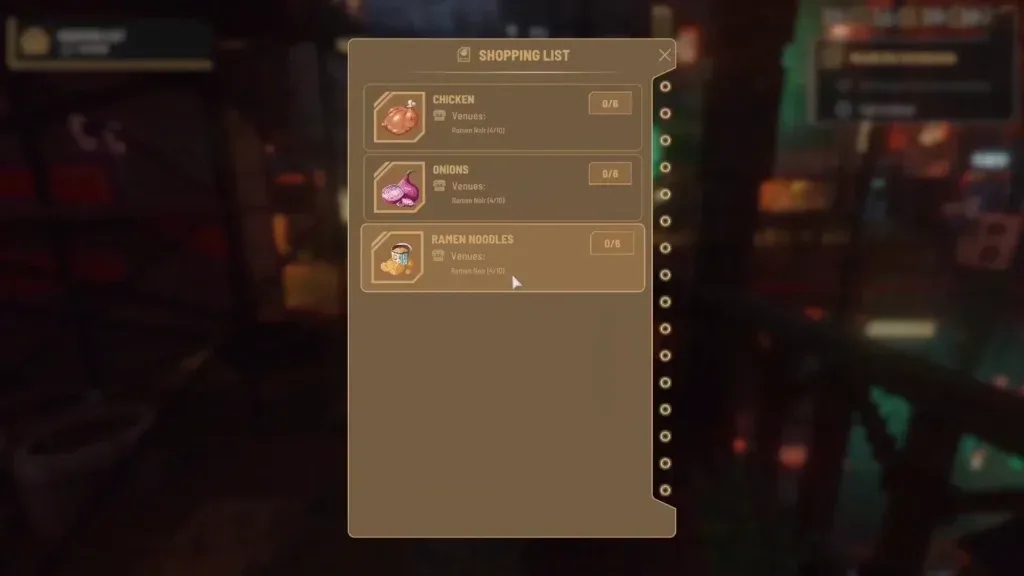
The screenshot illustrates where to inspect ingredient objectives. It is not a fresh measurement of Update 4 quantities. Use your current save's list and inventory for the actual comparison.
Manager buys nothing
Start with assignment and shift coverage. Then ask whether a required ingredient has reached zero, what target the venue uses, whether it is already in a queued delivery, and whether money and supplier stock are available. Check the exact ingredient rather than treating every unavailable dish as a restocking failure.
A meal can also fail because its processor is missing or its ingredients are in your personal inventory. Put a small manual purchase into the correct venue storage, then inspect whether the meal becomes available. If the stock count rises but the dish still cannot be prepared, continue with equipment and recipe checks through the restocking guide.
If there is no order despite a reproducible shortage, capture the Manager's role, shift, current action, menu, cash and supplier availability. Do not install an obsolete duplicate-buying mod to solve a no-order symptom; those are different failures.
Money was spent, but stock is still missing
An ingredient order and a completed delivery are separate stages. Update 3 counts queued delivery tasks and delays the notice until stock is delivered. Observe the worker's progress and compare the storage count after arrival.
The documented 10-to-4-second range covers the time until an ordered delivery is available. Travel, other scheduled work or a stuck worker can still delay completion. Record the stage where progress stops instead of declaring failure at the four-second mark.
Swipe horizontally to see all columns.
| Observation | Next useful check |
|---|---|
| No money spent and no delivery queued | Assignment, shift, shortage, available cash and supplier stock |
| Money spent or delivery queued; shelf count unchanged | Delivery availability, worker task and whether the delivery reaches this venue |
| Shelf count rises; dish still unavailable | All recipe inputs, required machine and storage location |
| New stock appears and quickly disappears | Record sales, recipe use and spoilage before assuming a second purchasing bug |
Manager buys too little or too much
For too little stock, identify the missing ingredient and compare the live objective with stored and incoming quantities. Check whether several dishes share that ingredient and whether service consumed stock during your observation. A before/after shelf count without those intervening events cannot measure how much the Manager ordered.
For excessive spending, record quantities bought, available stock, menu, money spent, deliveries and spoilage over the same observation period. Update 1 improved purchasing, and the Better Supplier Choice author says the earlier duplicate-vendor purchase bug was fixed natively. Update 3 accounted for queued deliveries; Update 4 adds configurable targets and daily budgets. These changes do not prove every save or mod combination is free of overbuying.
Older ingredient stock is consumed first following Update 2. That reduces waste but can affect freshness reviews, and it does not prevent every ingredient from spoiling. Reduce an overcomplicated menu while diagnosing a particular shortage, track unsold inputs and inspect storage rather than attributing every loss to the Manager. See the ordering and spending checks for the dedicated symptom.
Service congestion and stuck staff
Update 2 gives staff this native task order: serve a meal; process an ingredient; make a meal at a food processor or drink machine; take a new order; deliver ingredients as Manager; buy ingredients as Manager; manage a complaint as Manager; clean up a meal; clean trash as Cleaner; clean storage as Cleaner.
This describes native priorities, not a player-adjustable priority slider. A busy venue can occupy workers with service before lower-priority work. Record the worker's actual task, seating demand and role coverage before changing the roster.
The developers' October 2 workaround for staff getting stuck was to reduce hired staff, while October 5 changed staff spots. If the symptom persists on the newer update, try a controlled roster reduction on a backed-up save and note whether the same worker resumes. It is a dated workaround, not proof that every current stuck-staff case has that cause.
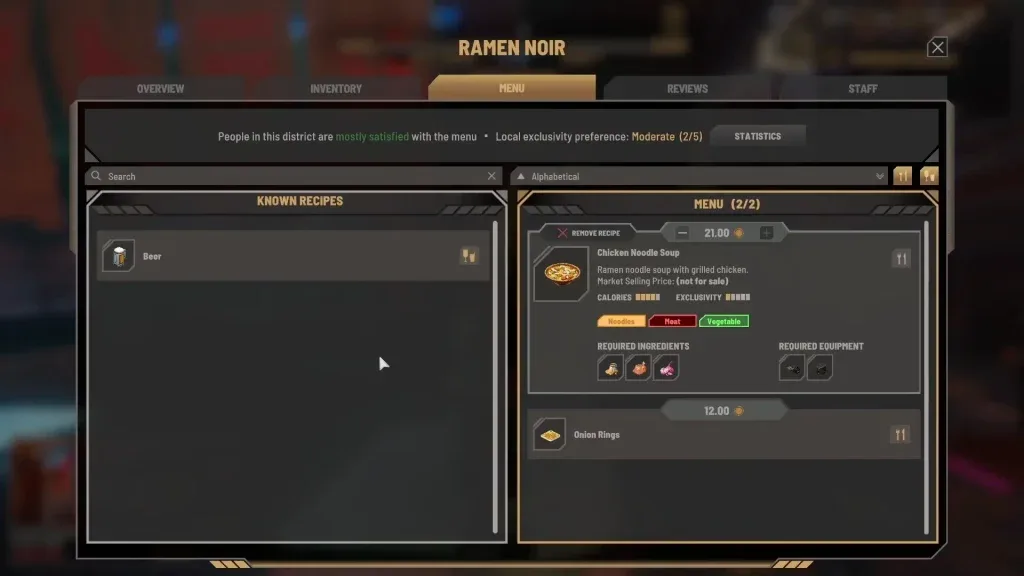
Compare menu requirements and equipment before adding more staff. If ingredients reach storage but meals remain unavailable, the recipe reference and ingredient finder help identify the missing input.
Supplier preference versus a purchasing replacement
Better Supplier Choice, formerly Manager Order Fix, changes supplier ranking: Vanilla, Cheapest, Local or Balanced. It leaves timing, amount and budget to the game. The October 8 Files page records main edition 2.1.1 and Standalone 1.1.0; the main edition requires ModKit 0.2 or later. Its description still reports testing on Patch 2, so Update 3 compatibility is not established by that statement.
Unofficial Patch 0.3.21, as documented on Thunderstore, instead provides venue-specific purchasing policies: stock coverage, cash reserve, spending limit and dish priorities. Its author says it accounts for shared ingredients, current inventory and incoming deliveries. Those are mod features, not settings promised by the native game.
The author notes that final policy save/reload, delivery accounting, controller behavior and other new features still require a complete in-game acceptance pass. Try it on a separate save. Back up BepInEx/config/NivalisUnofficialPatch/ManagerPolicies with your saves. Avoid a second purchasing replacement unless the patch's manager purchasing is disabled. See the current mod compatibility and installation guide before combining tools.
What to collect for a reproducible report
Save a copy before testing. Record the game build, venue, worker role and level, shift, active dishes, exact starting inventory, queued deliveries, supplier availability and money before and after the observation. Describe whether the failure is an absent order, a stalled delivery, a wrong quantity or a meal still unavailable after delivery.
For modded saves, include the plugin versions, loader build, purchasing configuration and relevant full log. State whether the symptom also occurs without the purchasing plugin on a copied save. A small repeatable example gives support more useful evidence than a general claim that the Manager is broken.