
Open the game’s Skills screen to read your player progression. Two retained first-day gameplay recordings show Trading, Boat, Farming, Cooking, Fishing, Business and Serving. Those seven categories are separate from an employee’s role skills, an individual venue’s level, the achievement points used for district access and the permit needed to expand your business.
Use this page to identify the system you need. It does not invent a complete XP table, a fastest skill farm or benefits that are absent from the recorded interface. The Business Skill guide covers Manager Efficiency in more detail.
Identify the seven player skill categories
Swipe horizontally to see all columns.
| Player skill | What to check in your game | Guide for the related activity |
|---|---|---|
| Trading | Your current level and the buy-price or vendor-tier information actually displayed | Ingredient and vendor lookup |
| Boat | The boat progression panel and any upgrade description you have unlocked | Boat access |
| Farming | The Farming entry while following your greenhouse tasks | Greenhouse setup |
| Cooking | Your player Cooking entry, kept separate from a hired chef’s skill | Recipe database |
| Fishing | The Fishing skill entry, kept separate from species discovery progress | Fishing guide |
| Business | The displayed Business level and Manager Efficiency | Business Skill |
| Serving | Your player Serving entry, kept separate from an employee’s waiter rating | Staff roles and scheduling |
The activity links help you perform the task associated with a category. They are not a claim that every action in those guides awards a known amount of XP. If your interface gives a new bonus or requirement, record that description before planning around it.
In one retained gameplay recording, Trading level 3 showed a 2% discount and a 98% buy-price display. That is a single recorded interface state, not enough evidence to extrapolate every Trading level, every vendor or a complete price formula. Likewise, a recorded Business level 2 comparison displayed 30% Manager Efficiency instead of 0%; it does not establish 30% lower purchasing costs or a 30% shorter delivery trip.
Separate the four common progress readouts
Swipe horizontally to see all columns.
| Readout | Who or what owns it | What does not follow from it |
|---|---|---|
| Player skill level | Your character’s Skills screen | A venue did not necessarily level up at the same time |
| Employee role skill | The hired worker’s staff card | Your own Cooking or Serving skill did not necessarily increase |
| Venue level | One restaurant or other operating location | Another venue did not automatically gain the same staff capacity or menu slots |
| Achievement points and permits | District progression and business expansion systems | A high Business skill does not automatically grant a particular permit |
Choose the right readout before comparing progress. For example, if the venue reaches the Manager unlock described at venue level 3, inspect the staffing panel and assigned role. A player Business level of 3 is a different number. If you catch a new species, inspect the Fish Database and discovery entry as well as the Fishing skill; discovering the fish and receiving skill progression are different results.
District unlock thresholds also changed in official Update 3. Read the current map and achievement window instead of treating a threshold in a launch screenshot as a permanent requirement. The same distinction applies to the Tier 1 permit: follow Business Empire, not an assumed skill-level shortcut.
Read the official staff skill changes correctly
Official Update 3 documents Manager skill experience from complaint attempts, ingredient orders and delivery to venue storage, with an additional bonus when a complaint has a positive outcome. It also ties the interval between an order and delivery availability to the Manager’s level, from 10 seconds to 4 seconds at maximum level. That is the availability interval after the order, not a guarantee that the full shopping and walking cycle finishes in four seconds.
Official Update 4 corrects how chefs’ skills influence action speed. It also fixes cleaner performance so movement and cleaning speed correctly increase with the cleaner’s level and happiness. These are staff changes. The notes do not publish a complete player Cooking XP formula or numerical cleaner speed table.
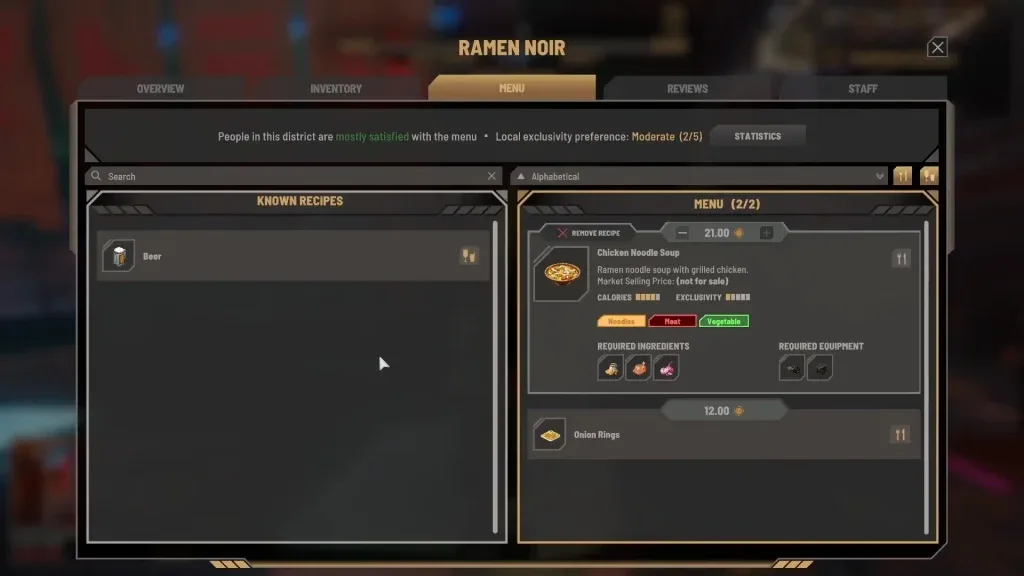
The venue interface is the place to compare that location’s staffing and operations. Read player progression in the separate Skills screen.
When a worker appears slower than expected, inspect the role assignment, schedule and required processors before blaming the player skill. A chef cannot complete a meal if the necessary ingredient or processor is missing, and a worker outside the assigned shift is not an isolated skill-speed test.
Choose a practical progression priority
Start with the task blocking your next useful action. If your goal is catching ingredients, get and equip a fishing rod, learn the fishing input, then inspect discovery conditions. If your goal is keeping a restaurant open, supply the active menu, assign staff and compare the venue’s finances before expanding.
For multiple venues, understand the native Update 4 restocking target and daily budget before judging Manager Efficiency. Lean, Normal, Extra and Recent Sales are venue settings; they are not player Business levels. A higher percentage cannot compensate for a menu ingredient that no vendor can supply.
Keep one variable steady when you investigate a change. Record the skill level and displayed bonus, carry out a short normal activity, then re-open the same screen. Compare the same venue or vendor where possible. More revenue after a level change can also result from customer count, menu composition, stock, wages or daily prices; it does not by itself isolate the skill as the cause.
Handle unexpected skill jumps
Launch-period players reported Business jumping from level 1 to level 5 after sleeping, and a developer acknowledged the issue in that discussion. That report is historical evidence, not proof that every current Update 4 save still has the bug or that sleeping is a legitimate fast leveling method.
If your level changes unexpectedly, preserve a manual save, note the installed game version and active mods, and capture the before-and-after readout. The official FAQ points bug reports to 505 support and asks for reproduction steps and relevant screenshots or video. Avoid applying a save edit merely because another player described the same number; the cause and later progression may differ.
Sources and limits
Reviewed October 15, 2026. The seven categories and early interface examples come from retained launch gameplay. Staff changes come from official Update 3 and 4 notes. Exact XP values and complete player bonus tables remain unverified here.