
To get your first boat in Nivalis Nights, travel to the Docks, speak to Crabface, and follow his directions to Salt Pete. Talk to Pete about the old boat, then board it. Ava handles its registration, giving you your own boat to steer. The first boat is handed over through this conversation; you do not need to buy it from a boat shop.
The practical sequence is Docks access, the two conversations, boarding, and registration. Fishing comes afterward. If your goal is simply to obtain transport and explore the water, you can focus on getting the boat and learning how to leave the helm and dock it again.
Reach the Docks by Taxi
Look for a taxi whose destination list includes the Docks. Taxis do not all offer the same destinations, so check the available route rather than choosing the first vehicle you find and assuming it connects everywhere.
If the taxi you are using does not list the Docks, try another taxi connection. The destination list is more useful than a direction such as “the leftmost taxi,” which depends on where you are standing and which transit point you have reached.
Do not wait at the subway for a different train to appear with a new destination. The subway serves its designated connections. For this trip, find the taxi route to the Docks and use the destination shown in that interface.
Once you arrive, explore the dockside on foot before looking for boat controls. Your first task is to meet the people involved in the handover. Seeing a boat beside the water does not explain its ownership or complete the conversation that directs you to it.
Speak to Crabface Before Looking for Pete
Find Crabface at the Docks and speak to him about the boat and becoming a sailor. His conversation points you toward Salt Pete. Follow that lead instead of searching for a vehicle purchase menu or a business upgrade that mentions transport.
Keep the conversation's directions in mind as you move through the dock area. The acquisition route leads toward Pete around the restaurant area, with the demonstrated approach taking the player behind it. Use that local landmark as a starting point rather than treating it as a permanent coordinate for every later encounter.
A named character can appear somewhere different when you return for a subsequent conversation. A later meeting near a taxi does not mean that the original handover must happen there. For the first boat, follow Crabface's directions and locate Pete for that conversation.
Crabface's discussion of a license is part of the boat's story. It is not an instruction to buy another restaurant business license. Continue the dockside conversation sequence before spending money on an unrelated unlock.
Accept the Old Boat from Salt Pete
Look for the tall robot with a straw hat and large round eyes. Talk to Pete about the old boat. He explains its unusual ownership history and offers it to you. The relevant outcome is permission to take the boat and become its next captain, rather than a choice of vessels at different prices.
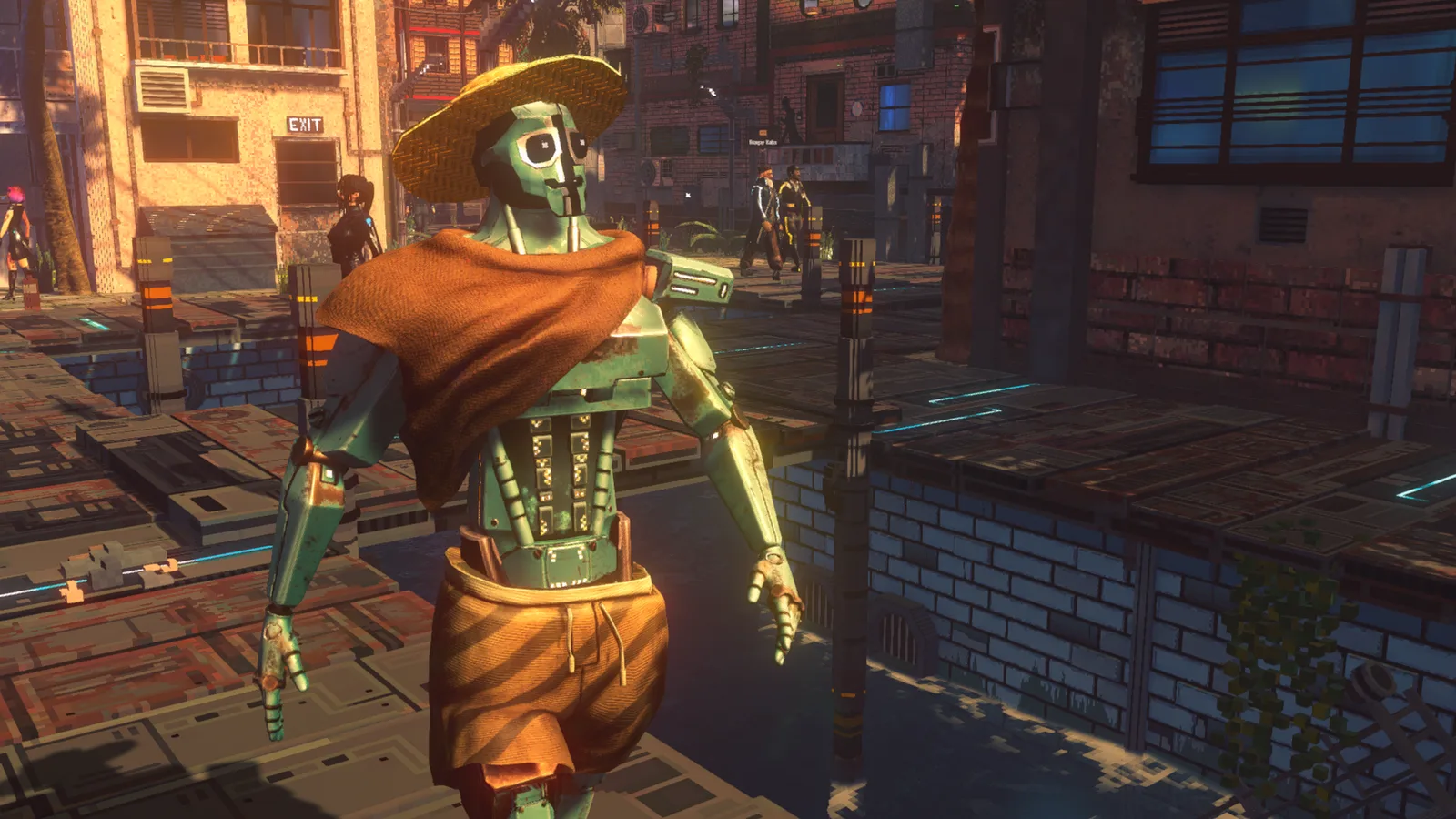
Recognize Salt Pete by his straw hat and large round eyes. This earlier character image identifies him; it does not show the boat handover.
Let the conversation reach the handover. If you have only spoken about the Docks or another topic, return to the dialogue about the boat before assuming that ownership has transferred. The boat explanation and the invitation to take it are the parts you are trying to reach.
You do not have to finish a treasure-fishing quest before receiving this boat. The fishing-related conversations and journeys follow the handover. Mixing those stages together can send you looking for fish or equipment when the immediate task is simply to talk to Pete and board the vessel.
Board the Boat and Confirm Registration
After Pete's invitation, approach the boat and use the boarding interaction shown by the game. Follow the prompts for the vessel rather than applying the controls from a taxi or another form of travel.
Ava's dialogue confirms that she has registered the vessel in the CorpSec maritime registry. That conversation provides the ownership confirmation after the handover. You are not required to travel to a separate registry office to perform the registration yourself.
| Checkpoint | What it establishes |
|---|---|
| Crabface directs you to Pete | You have the dockside lead for the boat |
| Pete invites you to take the old vessel | You have reached the handover conversation |
| You board the vessel | You have followed the invitation onto the boat |
| Ava confirms registration | The ownership introduction has completed |
| You can take the helm | You can begin the first trip |
Take the Helm for a Short First Trip
Use the boat's driving interaction and read the controls displayed in your build. The boat is a vehicle you steer yourself, unlike the taxis you use to reach districts. Do not assume that boarding immediately means every movement input is already controlling the vessel; check whether you have taken the helm.
Make your first trip short enough that you can practice returning to a dock. Leave the dock area, turn in open water, and then approach a marked docking location. This lets you learn departure and arrival together before committing to a longer journey.
Watch the route ahead while steering. The ocean provides a different perspective on Nivalis, but visible structures do not all represent places where you can disembark. Look for the game's docking markers when choosing somewhere to stop.
Ava's introduction discusses waves and weather on the water. Give yourself space to turn and approach a landing deliberately rather than rushing toward it. Follow the steering feedback and prompts on screen; this guide does not rely on an unverified keyboard layout.
Dock Inside the Green Circle
Approach the green docking circle and bring the boat into the marked area. Being near the dock is not the same as being positioned for the docking interaction. If an exit action is not available, check the boat's placement before searching for another route off the vessel.
Once parked, turn off the engine before leaving the helm. Players who remain in the driving position can miss the interaction needed to stop the engine and stand up. Check the helm area and the prompt there rather than repeatedly pressing unrelated movement controls.
The useful order is:
- Approach the marked docking area.
- Position the boat inside the green circle.
- Use the helm interaction to stop the engine.
- Leave the driving position.
- Disembark where the dock interaction allows it.
Stopping the engine matters even when the vessel appears stationary. A boat that has stopped moving can still leave you in its driving state. If you are unable to stand up, inspect that state before concluding that the dock is broken.
Leave the Helm When You Seem Stuck
If you are parked but cannot get out, look down toward the helm controls, slightly to the right, and look for the engine or exit interaction. Use the key or button currently displayed for that action. The camera direction helps you find the interaction target; it is not a substitute for parking at a suitable location.
Work through the two checks separately. First, verify the marked docking position. Then verify that the engine is off and you have left the helm. This is more useful than trying to force a disembark action while the game still treats you as the driver.
Fast travelling away from the boat can get you somewhere else, but it does not teach you how to finish a normal arrival. Learn the helm exit on your first trip so that later docking stops do not become repeated detours.
If the boat is moving again while you are trying to inspect the controls, settle the approach and stop before repeating the interaction. Keep the troubleshooting focused on placement, engine state, and the prompt you are aiming at.
Recall the Boat When You Return on Foot
You do not always have to retrace your water route to retrieve the boat. At the Docks, the blue BOAT sign provides a recall interaction. Use that when you have returned to the dockside by another means and need the vessel brought back.
For a routine return, use the docking sequence when approaching by water and the recall interaction when arriving on foot. That gives you a clear way to end a boat journey and a clear way to begin the next one.
Separate Boat Ownership from Fishing Progress
Obtaining the boat opens the water journey; it does not mean every fishing-related objective has already been completed. Pete has further interactions associated with fishing, and those can involve travelling and returning to speak with him again.
Likewise, a fishing marker and a docking marker solve different problems. When your immediate aim is to leave the driving position and walk onto a dock, use the marked landing and engine interaction. Fishing catches, bait, and treasure requirements belong to the fishing activity rather than the first boat handover.
Identify the Stage Blocking Your First Boat
If you cannot complete the acquisition, return to the last concrete checkpoint rather than repeating the entire trip without a specific goal. Use the issue you can see to choose the next check.
| Problem | Next check |
|---|---|
| The Docks is missing from a taxi's destinations | Find a taxi connection that lists the Docks |
| You reached the dockside but have no boat lead | Speak to Crabface |
| You found Pete but have not accepted the vessel | Continue the boat conversation |
| You have accepted the handover but are still on shore | Find and use the boat's boarding interaction |
| You boarded but are unsure ownership completed | Let Ava's registration exchange finish |
| You are parked but cannot stand up | Check the docking circle and stop the engine at the helm |
| You returned without the boat | Find the blue BOAT recall sign at the Docks |