
Nivalis Nights has no official multiplayer or co-op mode. Its official FAQ still describes a single-player game with no multiplayer features planned. An experimental community mod, NivalisMP, now offers a separate option for seeing friends in-game.
What the multiplayer mod actually shares
The NivalisMP author describes player-presence synchronization between separate saves. It does not turn your restaurant into a shared co-op business.
Swipe horizontally to see all columns.
| System | Author-described scope |
|---|---|
| Other players | Their character positions and actions appear in your game |
| NPCs, customer orders and world time | Separate for each player |
| Saved progress | Each player keeps their own save |
| Communication | Text and proximity voice chat |
| Item and money trading | Experimental; author says it is not fully tested |
If your goal is to jointly run one restaurant with shared orders and progress, the documented scope does not meet that requirement. This site has not run the mod or independently tested a multiplayer session.
Download the current client, then match its instructions
The author's Files tab, checked October 19, 2026, lists these releases:
Swipe horizontally to see all columns.
| Download | Version | Listed requirement |
|---|---|---|
| NivalisMP Client Mod | 0.4.4 | Use the package's current client instructions |
| NivalisMP Dedicated Server | 0.4.4 | Python 3.8 or newer |
Both files were uploaded October 17. The main description still names alpha 0.2.1 and its older archives. In particular, its older server instructions conflict with the current Python requirement. Do not rename an old ZIP instruction to 0.4.4 and assume the setup is unchanged.
Use the README supplied with your chosen current download. Compatibility with official Update #5 has not been verified here. A newer upload date alone does not establish support for your installed game build.
Identify the multiplayer window
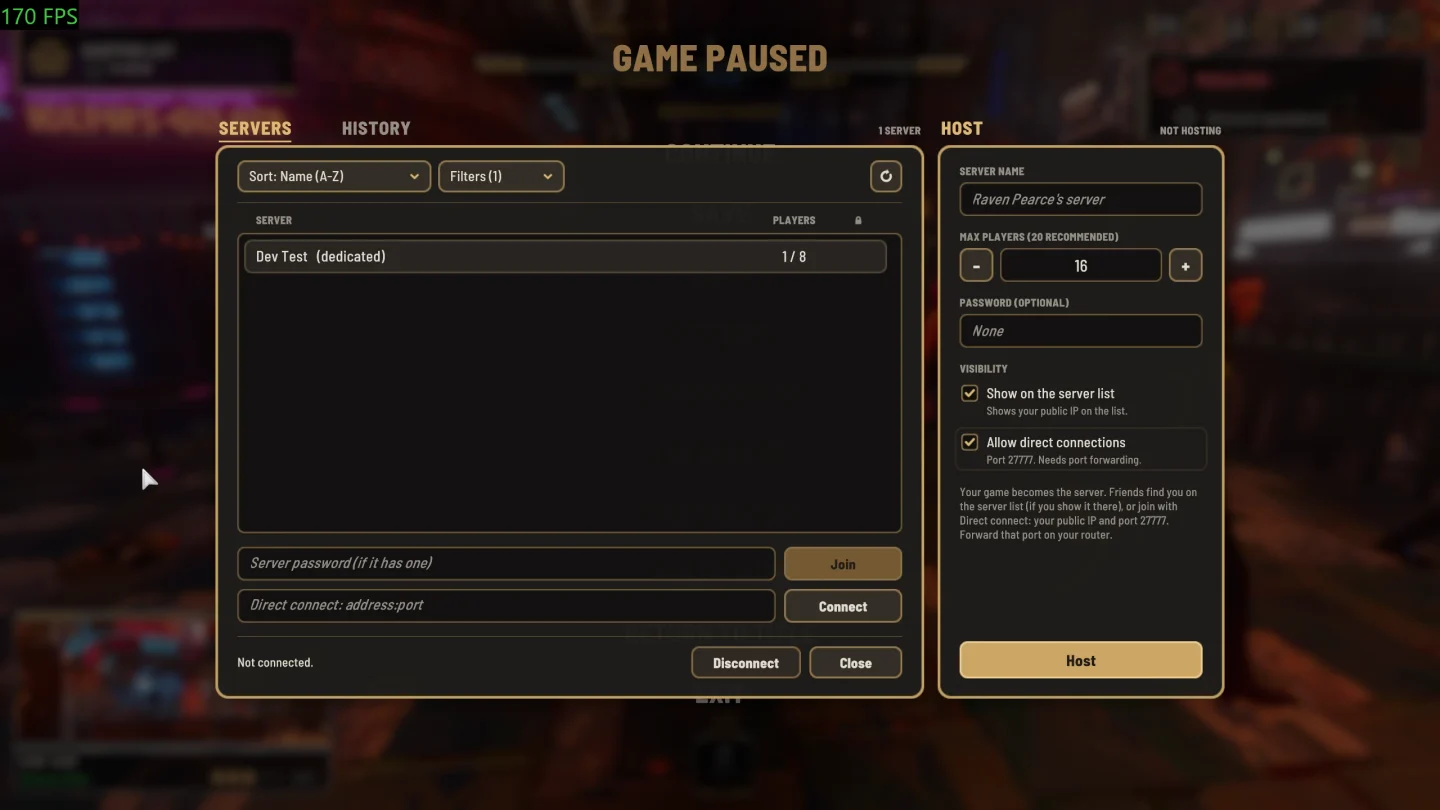
The author's interface image shows Servers, History, Direct connect and Host controls. Use it to recognize the mod window; it is not proof that a particular release has passed a connection test. The older description and this newer-looking interface are another reason to follow the downloaded package's README.
Prepare a test without risking your only save
- Preserve your existing game. Make an independent save backup before changing a mod setup. Use a copied save for the first test.
- Record the actual versions. Note your installed game build, client release and any server package. Keep these identifiers when comparing an error with the author's documentation.
- Check the client loader. The author lists the Nivalis BepInEx IL2CPP pack as a client dependency. If it does not initialize, follow the BepInEx loading checks before diagnosing a network problem.
- Follow the current package's connection instructions. Confirm the required host settings there. This page does not provide a verified 0.4.4 firewall or server-launch recipe.
- Verify one outcome at a time. Check whether the plugin loads, whether a connection succeeds, and whether the other player appears. Keep those results separate from any test of trading or saved progress.
A screenshot of the connection window can help when reporting a problem, but include the exact error and versions too. A window opening successfully does not establish that the next stage works.
Continue with the relevant setup guide
Use the mods directory to check the rest of your installed plugins, or the mod-manager guide when keeping separate profiles. For official platform availability, use the platform guide; an unofficial PC plugin does not establish console or cross-platform multiplayer support.