
Nivalis Nights recipe unlocks are tied to individual quests, conversations and named venue levels. Find the dish you want, compare its recorded condition with your current progress, then check your in-game recipe collection. For example, Accordion Potatoes is recorded at Ramen Noir Level 2, Black Widow at Honeycomb Level 4, and Brownie in a Neon Sellout conversation.
The planner below covers 193 community recipe records: 154 have a recorded unlock route, one is marked as a starting recipe, and 38 have an unknown trigger. Those counts describe this reference collection, not a verified total of recipes obtainable in the current game build. A quest checkbox records your progress; it cannot confirm which dialogue reward your save received.
Compare your progress with a recipe unlock
Compare the recorded unlock routes for 193 recipes with your completed quests and venue levels. Unknown conditions remain unknown.
- Open the planner and search the dish name. Select it under Target recipe to show its recorded route.
- Enter the level of the named venue when a venue check appears. Leave it unentered if you have not checked that business; a blank is different from Level 0.
- Mark a listed quest only when you have completed it. Read any conversation-specific note before treating that checkbox as sufficient.
- Follow the relevant link under Next steps and sources. It leads to the recorded quest, venue or character rather than an invented prerequisite chain.
- Return to the recipe collection in your game and verify that the dish appears. Use Save progress to keep your planner inputs for the next visit.
The tool compares recorded checks; it does not determine the fastest quest order or read your game save. Completing a quest may still leave a particular conversation reward unresolved. When several checks appear on one recipe, they remain separate unless the underlying source explains their relationship.
Read a venue-level unlock correctly
A venue reward belongs to the venue named in the record. Raising Ramen Noir does not satisfy a Honeycomb check. Enter the level displayed for the relevant business instead of substituting your Business Skill, Manager level or permit tier.
These examples show why the venue name matters:
Swipe horizontally to see all columns.
| Venue | Recorded Level 2 dish | Recorded Level 3 dish | Recorded Level 4 dish | Recorded Level 5 dish |
|---|---|---|---|---|
| Ramen Noir | Accordion Potatoes | Sailor Soup | Futu-Rice | Meridian Pizza |
| Honeycomb | Aurora | PB&J | Black Widow | Citrus Joos |
| Azure Breeze | Nivalis Sunset, with an additional quest record | Ocean Latte | Pina Colada | Purple Magic |
Select Black Widow and enter Honeycomb Level 2 to see a two-level gap against its recorded Level 4 check. Enter Level 4 and the tool reports that your input meets that check. Neither result estimates how long those levels will take, the money required, or whether the discovery event has already fired in your save.
For Accordion Potatoes, select the dish and compare Ramen Noir with Level 2. If the venue is already there but the dish is missing, open the recipe record and check the game collection before spending on ingredients. A matched numeric threshold is a reason to inspect the reward, not evidence that another purchase will unlock it.
When planning several dishes from one venue, change the target recipe after entering that venue's level. The same input remains available for its other recorded checks. For example, Ramen Noir Level 3 meets the reference thresholds for Accordion Potatoes and Sailor Soup, while Futu-Rice and Meridian Pizza still show higher targets. This is a comparison of the listed levels, not a claim that every earlier reward has been received.
Follow the quest reward or conversation
Quest-linked recipes name the story you need to inspect. Some records say quest reward; others explicitly say quest conversation. Preserve that distinction when you decide what to check next.
Swipe horizontally to see all columns.
| Target recipe | Recorded quest route | What to inspect |
|---|---|---|
| Tonkotsu Ramen | Noodle Bar Introduction | The recipe reward attached to the opening restaurant quest |
| Brownie | Neon Sellout | The recorded conversation, rather than the quest title alone |
| Bird's Nest | Mala Has Questions | The named quest's reward information |
| Blue Smoothie Bowl | SimBot Shenanigans | The named quest's reward information |
| Boba Tea | A Hacker's Guide to Exploring Nivalis | The named quest's reward information |
| VegCoffee | The Coffee Run | The named quest's reward information |
| Veggie Roll | Project Grapevine | The named quest's reward information |
| Strawberry Stinger and Ultra 64 | A Drink to the Past | Each dish's record and the quest's reward details |
For Brownie, open the Neon Sellout walkthrough and compare your active conversation stage. The planner's checkbox does not store individual dialogue choices, affinity values or branch outcomes. If the quest is complete but the recipe is absent, the detailed conversation is the useful next check.
A completed quest is remembered across target recipes in the planner. Marking A Drink to the Past therefore carries that input to Strawberry Stinger, Ultra 64 and any other record that names the same quest. The check stays your own report of quest completion; it is not a batch confirmation that you obtained every associated recipe.
The tables here identify routes, not a recommended order for completing unrelated stories. Use the selected recipe's source link for its specific starting conditions. If the quest is not available, compare your current journal objective with the quest troubleshooting guide rather than assuming that a recipe name establishes an entire dependency chain.
Keep Nivalis Sunset's two records separate
Nivalis Sunset has both Azure Breeze Level 2 and A Drink to the Past in its unlock record. The stored information does not establish whether these are alternative routes, joint requirements or different stages. The planner therefore displays both without joining them into a mandatory sequence.
If you mark A Drink to the Past complete while leaving Azure Breeze below Level 2, the result is one of two recorded checks matches your inputs. It does not say that half the unlock is complete or that you must purchase and upgrade Azure Breeze next. Open both attached sources and compare them with the recipe collection in your own save.
If both checks match, the same limit applies: verify that the dish actually appears. The count measures the information you entered against two recorded conditions. It is not a verified percentage of recipe completion.
Identify an unlocked recipe before planning service
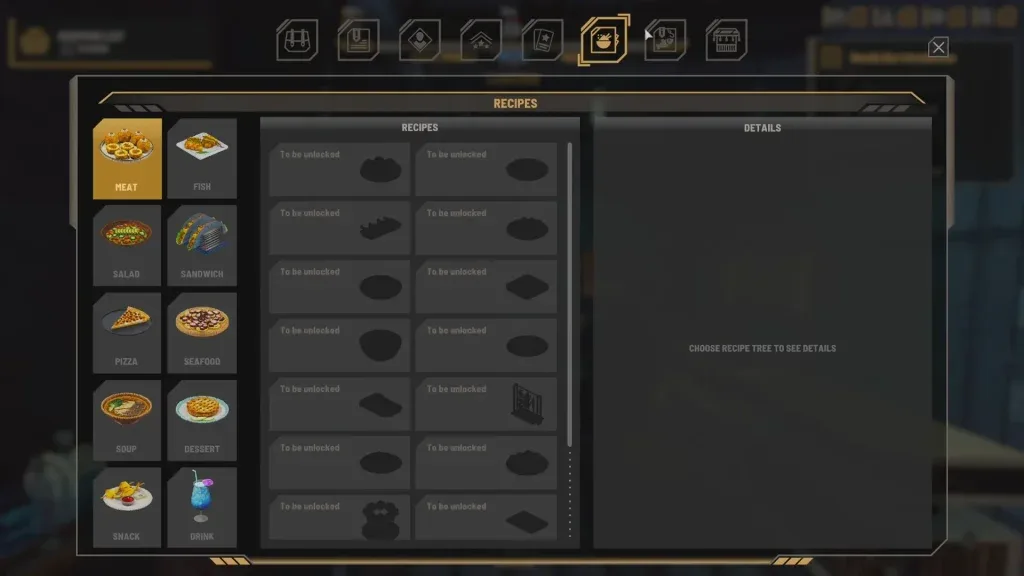
The recipe collection separates food categories and shows undiscovered entries as locked slots. Use it to check whether the named dish is known in your save. This retained screenshot illustrates that interface; it does not establish the latest catalogue size or the unlock state of any other player's game.
Chicken Noodle Soup is the single record marked as a starting recipe in this collection. Tonkotsu Ramen is a different dish with a Noodle Bar Introduction reward record. Keep the exact names separate when searching: having the starting soup does not demonstrate that you have received every recipe associated with the opening quest.
The collected Noodle Bar Introduction walkthrough includes recipe-tip conversations with Nola Berg, Dagmar Fitz and Marius Mitchell. It lists Beer, Onion Rings and Tonkotsu Ramen among the quest's recipe rewards. That quest-level list does not establish that every response to each character grants the same reward. Follow the relevant conversation and inspect your resulting collection.
Once you confirm the dish is known, open its linked detail page for ingredients and equipment. If your question has changed from “how do I discover it?” to “why can this restaurant not serve it?”, continue with the recipe database. The menu planner handles shopping quantities and shared ingredients after you have selected dishes to use.
Handle unknown triggers without inventing requirements
An unknown unlock is not a free unlock. For Bombies, the record names a conversation with Gunger Hahn but explicitly leaves the trigger unconfirmed. There is no verified level, quest checkbox or dialogue instruction in that record for the planner to compare.
For such a recipe, the tool keeps the note and character source link visible. It does not silently treat an empty requirements list as success. A character name is a lead to investigate, not proof that greeting the character, repeating a conversation or increasing a particular relationship value will grant the dish.
Use the exact recipe record when the same name appears in different guides. Check whether the source describes a reward, a conversation or only an unconfirmed association. If it does not provide the missing condition, retain that uncertainty instead of planning a guaranteed route around it.
Save progress and return to the next target
Select Save progress after entering venue levels or marking quests. Your target recipe and inputs are stored in this browser on this site. Changes made after saving remain unsaved until you select the button again. The tool does not upload a save file or synchronize progress between devices.
Clear saved progress removes this planner's stored inputs. It does not change your game or the separate menu planner. If browser storage is blocked, full or contains unreadable saved information, the tool displays an error. A failed save leaves your current on-screen inputs available; it must not be mistaken for a successful restore point.
Without JavaScript, use the recipe database link beneath the planner introduction. Individual dish pages still provide their recorded unlock notes and source links, so you can follow a route without using saved comparison inputs.
Sources and related next steps
Recipe conditions come from the dated community recipe reference, with individual source and check dates shown in the tool. See the source's methodology for its evidence limits. The Noodle Bar Introduction quest record supplies the opening recipe-tip stages discussed above.
This page adds progress comparison to the existing records; it does not establish new unlock conditions through a playthrough or game-file test. For the complete ingredient and equipment configuration of a selected dish, follow its local detail page. For purchasing after the unlock is confirmed, use the ingredient directory.