
To activate a Nivalis Nights key, sign in to the Steam client, open Games, choose Activate a Product on Steam…, and follow the prompts for your purchased code. After successful activation, the game appears in your Library, where you can download it.
Before purchasing, check that the product is a Steam game key compatible with your account’s country. A seller’s “can activate in United States” message describes that listing’s displayed region check; it does not establish worldwide activation. This page does not supply a free key or guarantee an individual seller’s code.
Check the Product Before Purchasing
A game title in a listing is not enough to identify what you are buying. Read the delivery type, platform, and activation restrictions together.
Swipe horizontally to see all columns.
| Field to check | What you need |
|---|---|
| Game | Nivalis Nights |
| Platform | Steam |
| Delivery type | A game activation key or code |
| Region | Your country included in the activation rules |
| Product terms | The seller’s current delivery and support terms |
A Steam wallet top-up adds funds; it is not the game. An account product is also different from a code you activate on your own account. A random-key offer does not establish that Nivalis Nights is the title you will receive.
Do not treat “global” in a headline as a substitute for the product’s actual country restrictions. Some listings provide a detailed country list. Check your own country there, rather than assuming that a price-comparison result applies to every buyer.
Activate the Key in the Steam Client
- Launch the Steam client and sign in to the account that should own the game.
- Open Games in the menu at the top of the client.
- Select Activate a Product on Steam….
- Enter the purchased code when prompted and follow the remaining instructions.
- After activation succeeds, find Nivalis Nights in Library and download it when ready.
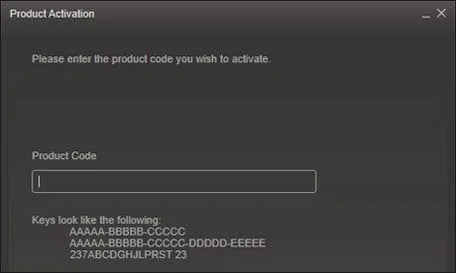
Enter the purchased code when the Steam Product Activation window asks for it.
The code comes from the order or delivery supplied by your seller. Do not enter a store order number in place of the activation code. Keep the purchase record available if the supplied code or delivery type does not match what the listing promised.
Steam also offers browser-based product registration. The client sequence above is the complete retained activation procedure; it does not require a Nivalis-specific launcher or a separate in-game code-entry screen.
Keep Region Messages Specific
The checked listings identify different details that should remain separate. One presents Digital Key Code, Steam, and an activation message for the United States. Another identifies Delivery: Steam Key and Activates in United States. These fields support the product type and displayed region, rather than a guarantee about every future order.
A compatible-country list is more useful than a storefront’s chosen language. For example, Hungarian appearing in a region list means activation in Hungary is covered by that listing; it does not mean the game contains Hungarian subtitles. Game language support and key activation territory answer different questions.
Prices, stock, and product restrictions can change. Use the current product page before buying instead of treating a recorded discount as a permanent lowest price. This guide does not certify retailer authorization, refund eligibility, or the authenticity of an arbitrary code offered elsewhere.
If Activation Does Not Complete
Keep the exact Steam message and the seller’s product details together. They let you distinguish a code-delivery issue from a platform or region mismatch. Do not assume that a failed activation can be repaired by entering the same code repeatedly or by changing your game’s settings.
Specific error-code repairs and retailer refund rules are not established here. A successful activation adds the game to your Library; it does not confirm that your PC meets its requirements or that a particular unofficial mod will work. Resolve ownership first, then use the relevant game guide for those separate questions.